APPENDIX A KNOWN BUGS IN LTP222A
A.1 Rare but serious 2ms DropOut Bug in LTP222A and LTP114J in later Dell Computers (450 MHz and faster)
I have recently found a serious bug in LTP222A and LTP114J that occurs with a Dell R450 (450 MHz Pentium II) and a Dell T500 (500 MHz Pentium III) computers. Roughly every 200 ms during a sweep the program stops acquiring data and outputting stimulus patterns for 1-2 ms. This means that a 0.1 ms pulse could be extended to 2 ms. This could, for example, cause serious corruption of some EPSP slope and popspike amplitude measurements.
| This bug, however, has not been found on many other recent computers: |
| 400 MHz Pentium II’s (Viglen Genie P2 400, Dell R400) | ||
| 450 MHz Pentium III’s (Dell T450) | ||
| 550 MHz Pentium III’s (Dell T550) | ||
| 600 MHz Pentium III (Gateway P600) |
| Nor has it been found on any 386, 486, Pentium, Pentium Pro or Pentium II computers below 450 MHz. |
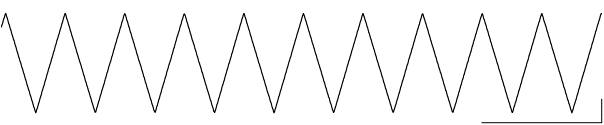
Most importantly, you can easily detect whether this problem is occurring by inputting a 100 Hz triangular waveform into the AD input and record say twenty or more 100 ms sweeps. If all the sweeps are like Fig. A.1.1 with no extra notches, then you have no problems. (You could also try testing higher frequency triangular waveforms). However, if you see a notch such as shown in Fig. A.1.2, then you have the bug, and the ‘LTP’ program should not be used on your computer. This notch occurs because the computer stops recording data (and stimulating) for 1-2 ms, but the waveform change continues, and therefore when it is next recorded it is at a much different amplitude.
As part of the ‘LTP’ program setup described in Section 2.9.1 of the ‘LTP’ Program manual and as one of the Conditions of Use, I stated that the program had to be tested with a triangular waveform input. I was serious about testing with a triangular waveform to basically make sure your equipment is working correctly, but the problem of dropout was then only one based on Murphy’s law. However, now that I have seen this bug on one computer, it could occur in others.
For now, if you are using a more recent computer I think you should definitely test your computer with a triangular waveform generator (eg Figs A.1.1 and A.1.2). Alternatively, if a waveform generator is not available, at least look at 50/60 Hz sine wave noise (everybody has that!). At minimum you should be aware of how your slope or popspike data would be corrupted by the 2 ms dropout.
PLEASE LET ME KNOW IF YOU FIND ANY COMPUTERS WITH THIS 2 MS DROPOUT PROBLEM.
In the next version of the program I will hopefully have the ‘LTP’ program automatically detect this error and exit if it occurs. In addition, I will try to install one of the newer PCI bus AD boards that have buffering for AD input and DA/TTL output.
I am still trying to find out the reason for this 2 ms dropout. (For you programmers out there, it even occurs when all interrupts are blocked by a non-trapped CLI instruction!!!)
Fig A.1.1. In most computers (386’s to Pentium III’s), no signs of signal dropout are apparent when a triangular waveform is input into a Pico ADC-42 board. Trace is 100 ms in duration (calibrations: 2V, 20ms).

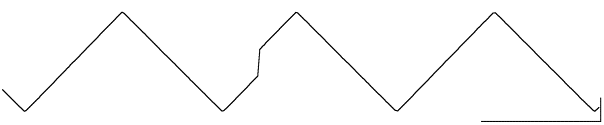
Fig A.1.2. In the Dell R450 450 MHz Pentium II computer, signs of signal dropout are apparent when a triangular waveform is input into a Pico ADC-42 board. The top 100 ms trace shows the 2 ms dropout occurring about 43 ms into the trace. The bottom trace shows an expanded 30-60 ms section of the top trace with the 2msec dropout occurring about halfway through (calibrations: 2V, 20ms or 6ms, bottom).
A.2 Error with the TimeOfDay clock on a 200MHz Pentium using a Labmaster board.
The TimeOfDay clock loses track of time on one 200 MHz Pentium computer. The ‘solution’ is to use a Digidata or Pico board instead.
A.3 Error plotting AD sweeps on the screen and the LaserJet printer at very high Y-axis sensitivities
This is a display problem on an AD sweep graph that occurs when the peak-to-peak Y-axis value (in mV or pA) is very small (e.g. sensitivity is high). Generally this is 100 to 1000 times more sensitive than values normally used and occurs at about the level that individual bits (voltage digitization) is seen. The problem is that lines extending beyond the minimum or maximum Y values of the graph are not clipped correctly. This is an error in the graphics display and is not a corruption of the internal data, nor is the data output to the ASCII ADsweep files corrupted.
APPENDIX B LIMITATIONS IN LTP222A
B.1 The LTP program only determines if the computer is fast enough for the data acquisition board during program start-up.
When the LTP program starts up, it automatically determines if the computer is too slow for the chosen data acquisition board, in which case it terminates. However, after this initial ‘speedtest’ the LTP program does not again check if the computer is fast enough for the data acquisition board. (Note that in future LTP programs, this will be tested on each sweep with computers using the Digitata board or having the Pentium (but not the 386 or 486) microprocessor.)
This means that if there was a microprocessor slowdown (which could occur if the microprocessor when into a power saving mode on a laptop computer, or if the ‘Turbo’ speed was inadvertently turned off), a 100 msec sweep would actually take twice as long (200 msec) in real time. This would mean that a 10 msec duration EPSP would actually appear having a 5 msec duration on the ADsweep graph, and the slope would appear twice as large.
If the synaptic potential duration or slope immediately and inexplicably changes by a factor of two, check that the synaptic potential duration is right by independently measuring it with an oscilloscope. Alternatively, if an oscilloscope is not available, restart the LTP program to test the data acquisition board speed again.
We have never seen this happen with our Dell and Gateway computers but it is possible that it could happen on your computer.
B.2 You must have either an S0 or S1 pulse in each ADsweep stimulation
In other words, you cannot set both S0=NONE and S1=NONE (and no Intracellular or Digital graphs) in a sweep in the Stimulation Protocol Dialog Box (Fig. 4.5.1).
B.3 Time to save a 100,000 byte ADsweep file
Because LTP222A saves ADsweep data as ASCII text files, the time to save will be longer than for binary files. Generally this has not been a problem, except for needing to save fairly large files fairly quickly on slow computers. The following values give you a rule of thumb on how fast your computer can save the ASCII ADsweep files. Times are for saving extracellular files of a few mV in each sample (e.g. -x.xxxx mV or 8-9 characters (bytes) per sample when including newline and linefeed line termination characters). Patch clamp files with values in the 1000’s of pA’s per sample would take approximately 33% longer (e.g. -xxxx.xxxx pA or 11-12 bytes per sample when including newline and linefeed line termination characters). Also, the time required to save an ASCII ADsweep file using the 32-bit Windows 98 FAT file system is the same as using the DOS/Win 3.x/Win95/Win98 16-bit FAT file system.
| Time to save a 100,000 | sample file (in sec) | |
| 16-bit FAT | 32-bit FAT (Win98) | |
| Dell 400MHz Pentium II | 1.3 | |
| Dell 333MHz Pentium II | 1.5 | |
| Dell 233MHz Pentium II | 5 | |
| Dell 200MHz Pentium Pro | 5 | 5 |
| Dell 133MHz Pentium | 5 | |
| Dell 120MHz Pentium | 5 | 5 |
| Dell 90MHz Pentium | 8 | |
| Dell 60MHz Pentium | 11 | |
| Dell 66MHz 486 | 14 |
The values for the 400 and 333 MHz Pentium II computers were obtained with LTP113E, all other values were obtained with LTP101M. Both these have the same code as LTP222A.
B.4 Substantial Input and Output Sample-to-Sample jitter
The Labmaster, Digidata and Pico ADC-42 boards have a substantial amount of sample-to-sample jitter on analog input, and analog-digital output on very slow computers, but somewhat less jitter on faster computers. The sample-to-sample jitter can be approximately measured by measuring the duration of a ‘100 usec’ train pulse (see Section 2.9.2). Note that an analog input is directly coupled to analog-digital output, so measuring sample-to-sample jitter on output indicates analog input jitter. The measured sample-to-sample output jitter was:
| sample-to-sample jitter | ||
| (usec) | ||
| Dell 400MHz Pentium II | + Pico42 | 3 |
| Dell 333MHz Pentium II | + Pico42 | 3 |
| Dell 233MHz Pentium II | + Digidata | 2.5 |
| Dell 233MHz Pentium II | + Pico42 | 2.5 |
| Dell 200MHz Pentium Pro | + Labmaster | 2.5 |
| Dell 200MHz Pentium Pro | + Pico42 | 2 |
| Dell 133MHz Pentium | + Digidata | 2 |
| Dell 133MHz Pentium | + Pico42 | 2.5 |
| Dell 90MHz Pentium | + Digidata | 3.5 |
| Dell 90MHz Pentium | + Pico | 3.5 |
| Dell 66MHz 486 | + Digidata | 3 |
| Dell 66MHz 486 | + Labmaster | 2.5 |
| Dell 66MHz 486 | + Pico | 3 |
| The values for the 400 and 333 MHz Pentium II computers were obtained with LTP113E, all other values were obtained with LTP101M. Both these have the essentially the same code as LTP222A. |
For example, on a Dell 486/66MHz with a Digidata board the duration of a ‘100 usec’ pulse can be anywhere from 98.5 usec to 101.5 usec.
For acquiring an analog signal every 100 usec or longer the 2-4 usec of jitter is probably no problem with the waveform analyses performed by LTP222A. The Peak Amplitude, DC Baseline, Cell Resistance and Series Resistance measurements are essentially independent of the 2-4 usec jitter, and the Slope measurement is also probably sufficiently independent of the jitter, because the slope is a linear regression line (least squares fit) calculated using many AD samples. For slope calculations lasting 0.6 to 2.0 msec (the range usually used in our group), 7 to 21 AD samples are used, respectively (sampling every 100 usec). However, each researcher will have to determine whether this level of input sample-to-sample jitter is acceptable in their particular experiment. If it is not acceptable, do not use the LTP222A program.
The same amount of sample-to-sample jitter on analog-digital stimulus pulse output (2-4 usec) is clearly acceptable for the 10’s to 100’s msec long intracellular stimulation pulses. Also, when the Stimulus Isolation Unit (SIU) is merely triggered by the stimulus pulse, the SIU pulse output duration is independently controlled by a knob on the SIU and there is again no problem. However, when the SIU pulse output duration is controlled by the duration of the stimulus pulse (analog controlled SIUs, and gated SIUs), 2-4 usec jitter in a 100 usec long stimulus pulse is probably too much when testing the responses to single pulses, particularly near threshold. However, it is up to each researcher to determine whether this level of output sample-to-sample jitter is acceptable in their particular experiment.
The fastest LTP stimulation is dependent on how many samples the ADsweep contains, the type of computer (processor & MHz), whether a disk caching program such as SMARTDRV is installed, and the type of AD board. If a Digidata or Labmaster board is installed, LTD stimulation can be changed in gradations of 0.1 sec, therefore achieving LTD stimulation periods of 0.5 sec (e.g. 2.0 Hz) or faster. However, if a Pico42 board is installed, LTD stimulation can only be changed in gradations of 1.0 sec, therefore achieving LTD stimulation periods no faster than 1.0 sec (e.g. 1.0 Hz).
For computers saving a 50 msec long ADsweep, and with signal averaging on but only saving the averaged (not the raw) sweeps, the fastest LTD sweep frequency for computers having a Labmaster or Digidata board is approximately:
| Fastest LTD sweep frequency (Hz) | |
| 66MHz/486 computers and above | 2 |
| 25MHz/486 computers and below | 0.5 |
Test this out on your own computer. If you want to increase LTD stimulation frequency try:
B.6 Some Sweep-to-Sweep Jitter During Rapid LTD Stimulation
There is also some jitter between the start of AD sweeps. For slow speed ADsweep stimulations (e.g. sweeps once every 15 seconds) this is clearly no problem. Even for higher speed LTD ADsweep stimulations (e.g. sweeps of 1-2 Hz or higher) this probably will not be a problem (although measure with an oscilloscope and look at the Amplitude/Calculation *.AM? file to make sure). The LTD sweep-to-sweep jitter presented below was measured as the jitter of the first pulse in a 50 msec long sweep. The signal averaging was On, but only the averaged (not the raw) sweeps were saved to disk), and values to the Amplitude/Calculation file were also saved to disk.
| Sweep-to-Sweep Jitter | ||
| (ms) | ||
| Dell 400MHz Pentium II | + Pico42 | 1 |
| Dell 333MHz Pentium II | + Pico42 | 1 |
| Dell 233MHz Pentium II | + Digidata | 17 |
| Dell 233MHz Pentium II | + Pico42 | 2 |
| Dell 200MHz Pentium Pro | + Labmaster | 2 |
| Dell 200MHz Pentium Pro | + Pico42 | 1 |
| Dell 133MHz Pentium | + Digidata | 16 |
| Dell 133MHz Pentium | + Pico42 | 2 |
| Dell 90MHz Pentium | + Digidata | 16 |
| Dell 90MHz Pentium | + Pico | 2 |
| Dell 66MHz 486 | + Digidata | 16 |
| Dell 66MHz 486 | + Labmaster | 2 |
| Dell 66MHz 486 | + Pico42 | 2 |
Measure this sweep-to-sweep jitter on your computer. If the jitter is too large:
B.7 If Digital Output stimulation is ON, then all stimulation graphs (S0, S1, IC as well as digital output graphs) are plotted
B.8 Boundary Problems in Digital Filtering
Digital filtering is not accurate at beginning and ends of an AD sweep trace (where it filters to 0 mV or 0 pA). Because of this, Filtered traces are not presently saved, only Raw or Averaged traces can be saved. However, on-line analysis and off-line reanalysis can be done on Filtered traces provided care is taken not to use data points near either the beginning or end of the AD waveform.
B.9 Labmaster Time-Of-Day Clock
When using the Labmaster board, the Time-Of-Day timer will not work correctly for more than 24 hrs after staring the LTP program.
B.10 Computer / AD board combinations that are too slow
Some combinations of computers and AD boards may not be fast enough to sample at 100 usec ADsample interval. LTP222A works with a Labmaster board on all computers tested. LTP222A also works with a Digidata board on all computers tested, although it was not tested on 386 computers. LTP222A also works with a Pico board on all computers tested, with the one glaring exception of an Acer Pentium notebook computer! - although again it was not tested on 386 computers. This is a good example of how a 486 can be actually faster than a Pentium II with the Pico board!!!
To test the speed of your AD board enter the following at the DOS command line if you are using the Labmaster or Digidata board:
C:\YOURDATA\980704\ ltp222a speed
or this, if you are using the Labmaster or Pico board:
| C:\ YOURDATA\980704\ ltp222a labmaster speed | ||||
| C:\ YOURDATA\980704\ ltp222a pico42_dio_1 speed | ||||
| C:\ YOURDATA\980704\ ltp222a pico42_1__dio_2 speed |
These are some of the results I found:
| Minimum ADinterval | ||
| (in usec) | ||
| Gateway 700MHz Pentium III | + Pico42 | 66 |
| Dell 400MHz Pentium II | + Pico42 | 70 |
| Dell 333MHz Pentium II | + Pico42 | 66 |
| Dell 233MHz Pentium II | + Pico42 | 68 |
| Dell 200MHz Pentium Pro | + Digidata | 56 |
| Dell 200MHz Pentium Pro | + Pico42 | 73 |
| Dell 133MHz Pentium | + Digidata | 41 |
| Dell 133MHz Pentium | + Pico42 | 60 |
| Dell 120MHz Pentium | + Digidata | 46 |
| Dell 120MHz Pentium | + Pico42 | 72 |
| Dell 90MHz Pentium | + Pico42 | 76-89 |
| Dell 60MHz Pentium | + Labmaster | 58 |
| Dell 60MHz Pentium | + Pico42 | 81 |
| Dell 66MHz 486 | + Pico42 | 54-59 |
| All Labmaster and Digidata measurments were only done using LTP222A. PicoBd measurements made using LTP114J or earlier code (hasn't changed in LTP222A) |
APPENDIX C BUGS AND 'FEATURES' IN LTP114J THAT HAVE BEEN FIXED IN LTP222A
C.1 Calculation of area
This is the one somewhat serious bug I found in LTP114J calculations.
In LTP114J, for any event of X ms in duration, the area calculation will be off by a maximum of Y % |
| X | Y | ||
| 100 ms | 0.05 % | ||
| 10 ms | 1 % | ||
| 5 ms | 2 % | ||
| 2 ms | 5 % | ||
| 1 ms | 9 % |
Since most synaptic events are longer than 5ms, this error is probably not a serious problem. If your event is less than 5 ms, you may want to reanalyze it with LTP222A. You could also check your area calculation obtained with LTP222A against another analysis program! Sorry about this. No user reported this bug. I found it when I was retesting the code. Feel free to contact me ([email protected]) if you have a question concerning area calculation.
In LTP222A, for any event of X ms in duration, the area calculation will be off by a maximum of Y % |
| X | Y | ||||
| 1-100 ms | 0 % | (could not detect any error) | |||
| 0.1 ms | 1 % |
C.2 Moving protocol files from a computer with a Pico or Digidata 1200 board to a computer with a Labmaster board.
Fixed in LTP222A.
In LTP114J, the reason a protocol file developed on a computer with a Digidata or Pico board would not run on a computer with a Labmaster board (and vice versa) was because of the difference in the way the Physical AD Channel Number (0 for Digidata and Pico board, 15 for Labmaster board) was put into the *.pro protocol file.
C.3 When reanalyzing using ADsweep files taken with the Pico board, in LTP114J you had to start the program with the Pico board on the command line.
It is no longer necessary to do this in LTP222A. See Section 2.3.3.
C.4 Slight Inaccuracy in Plotting Calculated Amplitudes/Slopes on Waveforms
Fixed in LTP222A. Wonderful. Check out how the Amp/Slope calculation lines lay correctly on the acquired waveform!
C.5 Reanalysis cannot be performed from data written (once) to a read only CD-ROM (CD-R)
Fixed in LTP222A. See Section 6.1.
C.6 Errors occurring when the LTP222A program is started from the C:\ root directory
Fixed in LTP222A. However, you still should not save your data files to the root directory because this could become full with about 500 files.
APPENDIX D FUTURE LTP PROGRAM CAPABILITIES
D.1 The following capabilities will be added to LTP version 2.3 (the last official DOS version) |
| a. | Install an inexpensive multi-channel AD board for the ISA bus (the DOS version of the LTP program will not support PCI only bus computers). | ||
| b. | Reanalyze generic ASCII ADsweep files (with no headers). |
D.2 The following capabilities may be added to LTP version 2.4 (this will be an MRC Centre internal version that I may put on the website) |
| a. | Capture and analyze spontaneous bursts (for epilepsy studies) | ||
| b. | Sync Input to begin stimulation and acquisition |
D.3 Plan to do in the Windows version, but not in the DOS version |
| a. | Improve patch clamping ease of use | ||
| b. | More accurate on-line Rs measurements, which will require higher sampling (20 us rather than 100 us) and many short, averaged Rs pulses. | ||
| c. | Autodetect & set ADgain for Axon Instruments patch clamps | ||
| d. | Saving long ADsweeps in binary (pClamp compatible) files | ||
| e. | Increment/Decrement Protocols to run Input / Output (Stimulus Amplitude / EPSP amplitude) curves, or synaptic and cell I-V curves | ||
| f. | Continuous DC chart recording | ||
| g. | Good implementation of capturing and analyzing spontaneous bursts |
D.3 Windows
I plan to write a Windows LTP program that will run on Windows 2000 and will use the Axon Digidata 1322A (and quite possibly the Digidata1200) as well as other AD boards. This is primarily because the current DOS version of the LTP program will not run on the latest PCI-only bus computers.
I also do not know whether a Windows LTP program would continue to be free to academic users. Quite possibly the program running in acquisition mode would cost $500 to $750 per copy, but the program running in analysis mode would still be free. As far as I’m concerned, the main reason to make a data acquisition program free is if the total cost of doing data acquisition (including computer, program and data acquisition board) is substantially reduced. With DOS I can make an LTP system (program and data acquisition board) for a fraction of the cost of a Windows LTP system. In Windows, because on-board buffering of analog and digital input/output signals sends the cost of data acquisition boards to several thousand dollars, an inexpensive LTP system is not achievable. My primary concern is that the researchers without the big grants can do LTP data acquisition inexpensively. This has been achieved with the current DOS version of LTP. For those researchers with big grants who want the latest GUI features in a Windows program, the only difference of whether a program is free or not is merely the inconvenience of having to buy it.